Built for deck crews · Lifting gear first · v0.1 in development

Every shackle.
Every certificate.
Every inspection date.

DEM keeps a vessel's lifting equipment and its stores in one register: what it is, what it lifts, which certificate backs that number, and when it is next due. Then it prints the two documents that actually get asked for — a handover for your relief, and an inspection report for the surveyor.

SWL & Certificates Inspection Alerts Excel Import Handover Report Inspection Report Your Own Stores Works Offline
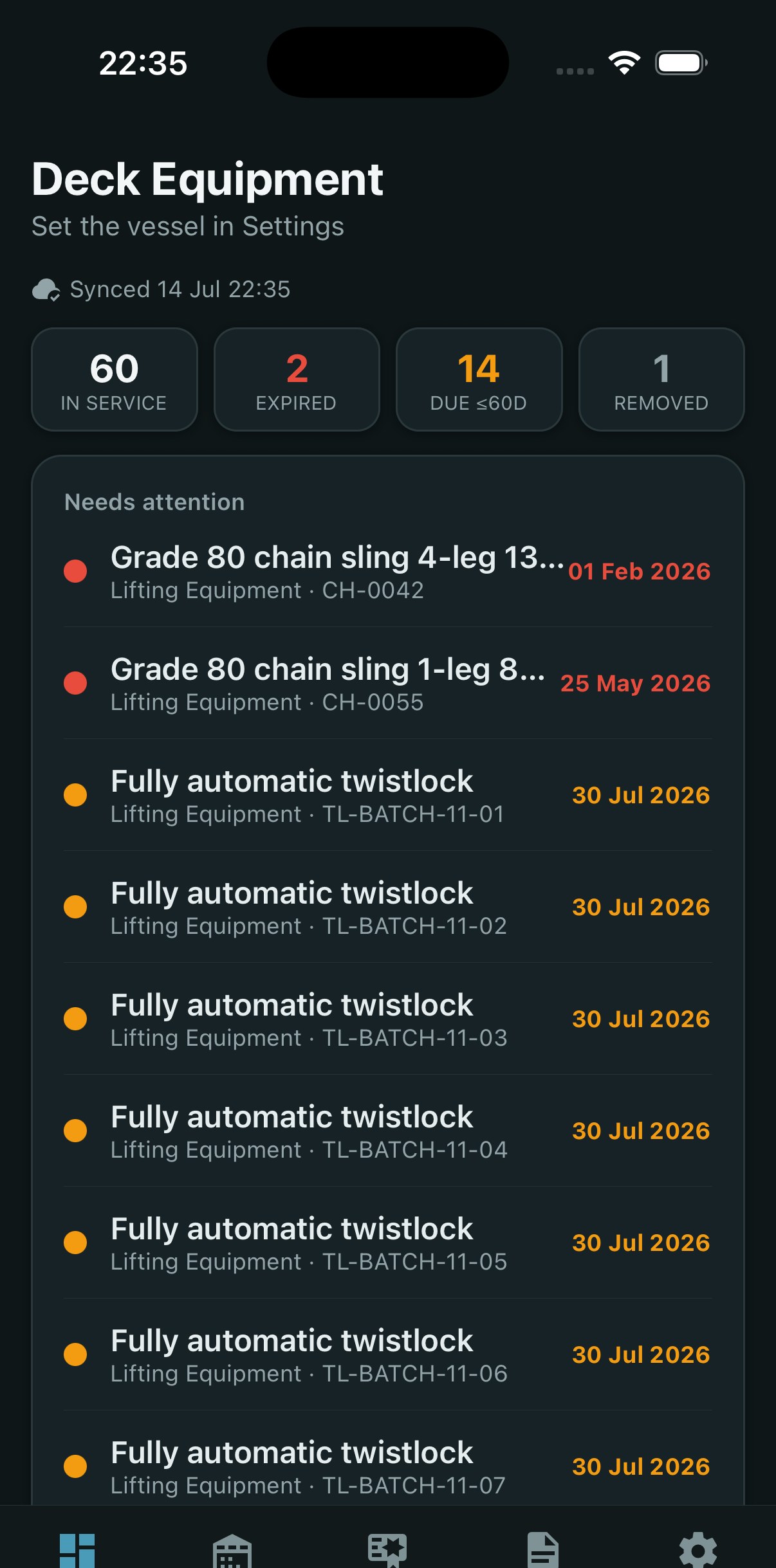
🔔Chain sling CH-0042 — overdue
📄Handover report — 1 tap
DEM on iPhone — dashboard showing overdue and due lifting gear
🪝 Lifting Gear & Rigging
Bosuns & Chief Officers
📋 Built for PSC & Class
📡 Works Offline at Sea
📱 iOS · Android
Why DEM

The register nobody
wants to be holding

DEM was built around what actually goes wrong with lifting gear aboard — not around a feature list.

📒
The certificate that can't be found

A surveyor points at a shackle and asks for the certificate behind its SWL. The number is stamped on the body; the paper is in a folder, in a locker, from two crews ago. In DEM the certificate is attached to the item, and one certificate can cover the whole batch it came with.

📆
The inspection that quietly lapsed

A date in a spreadsheet nobody opened. DEM sorts every list worst-first: what is overdue leads the screen, then what falls due inside 60 days. An item with no date recorded shows as “No date” — not as compliant, because a missing date is not a clean one.

🔁
The handover that lived in one man's head

The bosun signs off and takes with him what he knew: which sling to watch, which pin sticks. DEM's handover report leads with exactly that — overdue, due, removed from service, low stock, signed out, and the items he flagged for a second look, with his reason.

Features

What the deck department
actually keeps track of

Lifting equipment first, because it is the register with the sharpest teeth. The other stores follow the same shape.

🪝
Lifting Equipment

Slings, shackles, chains and container twist-locks, each with its own SWL, certificate reference and next-inspection date. Anything taken out of service is excluded from the counts — and still listed, visibly, so it is never quietly missing.

SWL · certificate ref · inspection dates · removed-from-service
📜
Group Certificates

One certificate usually covers a whole batch — twenty twist-locks, six shackles. DEM links it to every item it covers, so opening any one of them shows the paper behind its rating.

One cert → many items · linked on import
📊
Excel Import

Each store hands you a blank template with the columns its type actually uses. Fill it in ashore, bring it back, and see exactly what will happen before a single row is written — including every warning.

Per-store templates · full preview · row-numbered warnings
🔢
Batch Expansion

A row of twenty twist-locks becomes twenty items — each with its own ID and its own life, so a single defective one can be pulled from service alone. A sticker on a box of twenty is not traceability.

Quantity 20 → 20 items · serials suffixed · one shared certificate
📷
Photos & Documents

Up to four photos or files on any item — the tag, the damage, the certificate. They stay on your device and travel in a backup or a ZIP export, never uploaded behind your back.

Camera · library · files · on-device only
🚩
Flag for a Second Look

Not a compliance status. An item can be perfectly in date and still need attention — rust starting at an eye, a sticky pin. Flag it with a reason, and it lands in the handover report where the next keeper will read it.

Own list · own report section · with your reason
☁️
Your Account, Your Register

Sign in with your email and the register follows you — phone today, browser and Mac next. Records sync; the photos and certificate files stay on the device. Once signed in, the app works offline for as long as the vessel is out of coverage.

Email account · records sync · files stay local · offline-capable
💾
Backup & ZIP Export

A single .dem file holds the whole register plus every attached file, and restores onto a new phone in seconds. The ZIP export packs a report together with the certificates behind it — the paperwork travels with the numbers.

.dem backup · ZIP: report + certificates + photos
QR Labels Coming next

Every item gets a printable QR label from the moment it is created — thermal printer, 100×50 or 50×30 mm. Scan it on deck and its record opens: SWL, certificate, next inspection.

Thermal labels · batch printing · scan to open
📦
Stock Movements Coming next

For the consumable stores: an in/out ledger behind every balance, so a drum that emptied has a reason and a name against it, not just a smaller number.

Received · consumed · damaged · written off
🖥️
Web & Mac Coming next

The same register in a browser and on a desktop, under the same account — for the office, and for the screen a surveyor can actually read.

Same account · same register · macOS & Windows
📐
Rigging Catalog

Standard sling, chain, shackle and twist-lock sizes to speed up data entry — and deliberately no SWL values. Real safe working load comes off the item's own certificate, never off a size chart.

Sizes & types only · EN 1492 colour code · never a load rating
Reports

Two documents.
Two different jobs.

The same register, but not the same paper. A relief taking over the store and a surveyor holding a clipboard are not asking the same question.

Handover

For the man taking over the store. It leads with what he is inheriting, because that is what he is about to answer for.

  • Overdue and falling-due items, first, before anything else
  • Removed from service, low stock, tools still signed out
  • Items flagged for a second look — with the reason
  • The full register, and the movements of the period
  • A signature block for both parties

Inspection

For PSC, class or an internal audit. It leads with the compliance headline and sorts every table worst-first — because hiding the bad item only means it is found later, and found worse.

  • How many expired, how many due, how many in date
  • Lifting gear with no SWL or no certificate — flagged before he asks
  • Removed items listed separately: visibly excluded, not missing
  • The certificate register that backs every SWL in the tables
  • Blank fields print as “—”. Nothing is ever inferred.
Stores

Your vessel's stores,
not somebody's template

Two deck lockers, a bosun store, a paint locker aft. No two ships are stowed alike, so you create the stores — a name, a position aboard, and a type.

🪝
Lifting Equipment

SWL, certificate and inspection dates, mandatory on every item.

Deck Store

Ropes, tarpaulins, hardware. A balance and a low-stock threshold.

📦
Bosun Store

Consumables and deck spares, tracked by quantity.

🧪
Chemical Store

Expiry dates, batch numbers, and room for the MSDS.

🎨
Paint Store

Expiry, batch and litres — twenty litres stays twenty litres, not twenty items.

🧰
Workshop Tools

Calibration dates for the instruments, and who has the tool right now.

The type is what does the work: it decides whether a date means expiry or inspection, whether a balance is tracked, whether SWL and a certificate are required. That is why a paint locker's template asks for litres and an expiry, and a lifting register's asks for an SWL and a certificate number.

Get the App

Not in the stores yet.

DEM is in active development. The lifting-equipment register, the stores, the Excel import and both reports work today — the app simply has not been published yet.

In development. We would rather tell you that than sell you a download button that goes nowhere. Write to us and you will get it as soon as there is something to install.
🍎 App Store — coming soon 🤖 Google Play — coming soon
Request Early Access
iOS & Android · a browser and macOS build are next
Get In Touch

Know what your
gear is rated for.

Tell us what your vessel's register looks like today — a folder, a spreadsheet, a whiteboard — and we will tell you honestly whether DEM is ready for it.